The Best Background for Professional Headshots
The best backgrounds for professional headshots — neutral, office, outdoor and color options — and how to pick the right one for your industry.
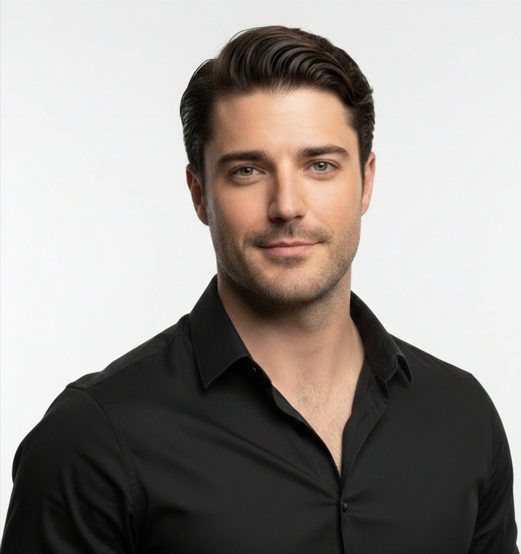
The best background for a professional headshot is clean and uncluttered so attention stays on your face — a neutral gray, soft white, or gently blurred office works for almost everyone. Choose a slightly darker neutral for authority, a lighter one for approachability, and match the tone to your industry. AI tools let you try several backgrounds from one upload.
A background should do one job: keep all the attention on your face. Get it wrong and the eye wanders to the clutter behind you; get it right and you look polished and intentional. Here is how to choose the best background for your headshot, by style and by industry.
Neutral solid backgrounds
A solid neutral — gray, soft white, or a muted color — is the safest, most versatile choice. Mid-to-dark gray is the workhorse of professional headshots: it flatters most skin tones and clothing and never goes out of style. Lighter backgrounds feel open and approachable; darker ones feel formal and authoritative. Pick the tone that matches the impression you want to make.
Office and blurred environments
A softly blurred office or workspace adds context and warmth, signaling that you are active in your field. The key word is blurred — the background should be recognizable but not detailed enough to distract. Avoid messy desks, glaring screens, and busy bookshelves. A clean, out-of-focus environment reads as professional; a cluttered one reads as careless.
Outdoor and natural light
Greenery or a softly blurred outdoor setting can look fresh and approachable, which suits real estate, coaching, wellness, and creative roles. Keep it simple and well-lit, and make sure nothing appears to grow out of your head. Outdoor backgrounds work best when the focus stays clearly on you and the setting is just a gentle wash of color.
Color backgrounds
A subtle color background can reinforce a brand or add personality, but tread carefully. Muted, desaturated tones work; bright, saturated colors cast their hue onto your skin and can look amateurish. If your company has brand colors, a muted version can be a smart, cohesive choice.
Match the background to your industry
- Lawyers and executives: dark neutral or formal office — signals authority and trust.
- Doctors and healthcare: clean light neutral or a soft clinical setting — signals calm competence.
- Real estate and sales: blurred office or bright outdoor — approachable and energetic.
- Tech and startups: clean neutral or modern workspace — current and unfussy.
- Creatives and actors: a bit more latitude, but keep it intentional, not chaotic.
Common background mistakes
- Standing too close to a wall, which creates harsh shadows behind you.
- Busy patterns, doorframes, or plants that seem to sprout from your head.
- Pure white that blows out and loses all separation from light clothing.
- Over-saturated colors that tint your skin.
Try several backgrounds with AI
One advantage of AI headshots is that you are not locked into a single backdrop. With ProPicStudio you upload as few as 6 selfies and get 100+ headshots across a range of professional backgrounds in minutes — so you can compare a clean neutral against a blurred office against a subtle color and pick what fits your field. Export up to 4K PNG, and if nothing lands, the 14-day money-back guarantee has you covered even after download.
Light vs dark backgrounds: which to pick
A simple rule helps: light backgrounds feel open, friendly, and modern; dark backgrounds feel formal, dramatic, and authoritative. Match the tone to the impression you want and to your clothing — a dark suit can disappear into a dark background, so add a touch of separation, while light clothing against a light background needs enough contrast not to wash out. Aim for clear separation between you and the backdrop so your shape reads cleanly.
Consistency across a team
If several people in an organization need headshots, pick one background and stick to it. A consistent backdrop makes a team page or directory look intentional and credible, even if the photos were taken at different times. This is one area where AI is especially handy — everyone can generate against the same neutral background and the set will look cohesive.
When in doubt, choose a clean neutral gray. It is the most reliable background there is, and it lets your face — the actual subject — do the work.
Related reading
Robert J Hogan
Founder, ProPicStudio
Robert J Hogan is the founder of ProPicStudio. A full-stack engineer with 5+ years building scalable software and AI systems, he started ProPicStudio to make studio-quality, true-to-life headshots accessible to everyone — no photographer required.